Sales Summary - Transactions Tab
The Transactions tab is used to review vehicle sales information based on the deal type, such as cash or finance, and the vehicle type, such as new or used.
Note - The Transactions tab is only available if Deal Type is selected in the Type field in the Report Criteria section when the report is requested.

|
To access the Transactions tab, select the Transactions tab on the Report Results panel on the Sales Summary screen. |
The Sales By Pay Type graph displays the percentage of vehicle sales based on deal type for all vehicles sales. This graph also displays vehicles sold to XtreamService prospects. The Sales By Vehicle Type graph displays ratios of new, used, and certified vehicle sales for all vehicles sold, as well as for vehicles sold only to XtreamService prospects.
 Pay Type Results Section
The Pay Types Results panel is used to review information regarding vehicle sales based on the type of deal, such as finance or lease. Fields in this section display gross profit or revenue based on the entry in the Displayed Results field in the Report Criteria section.
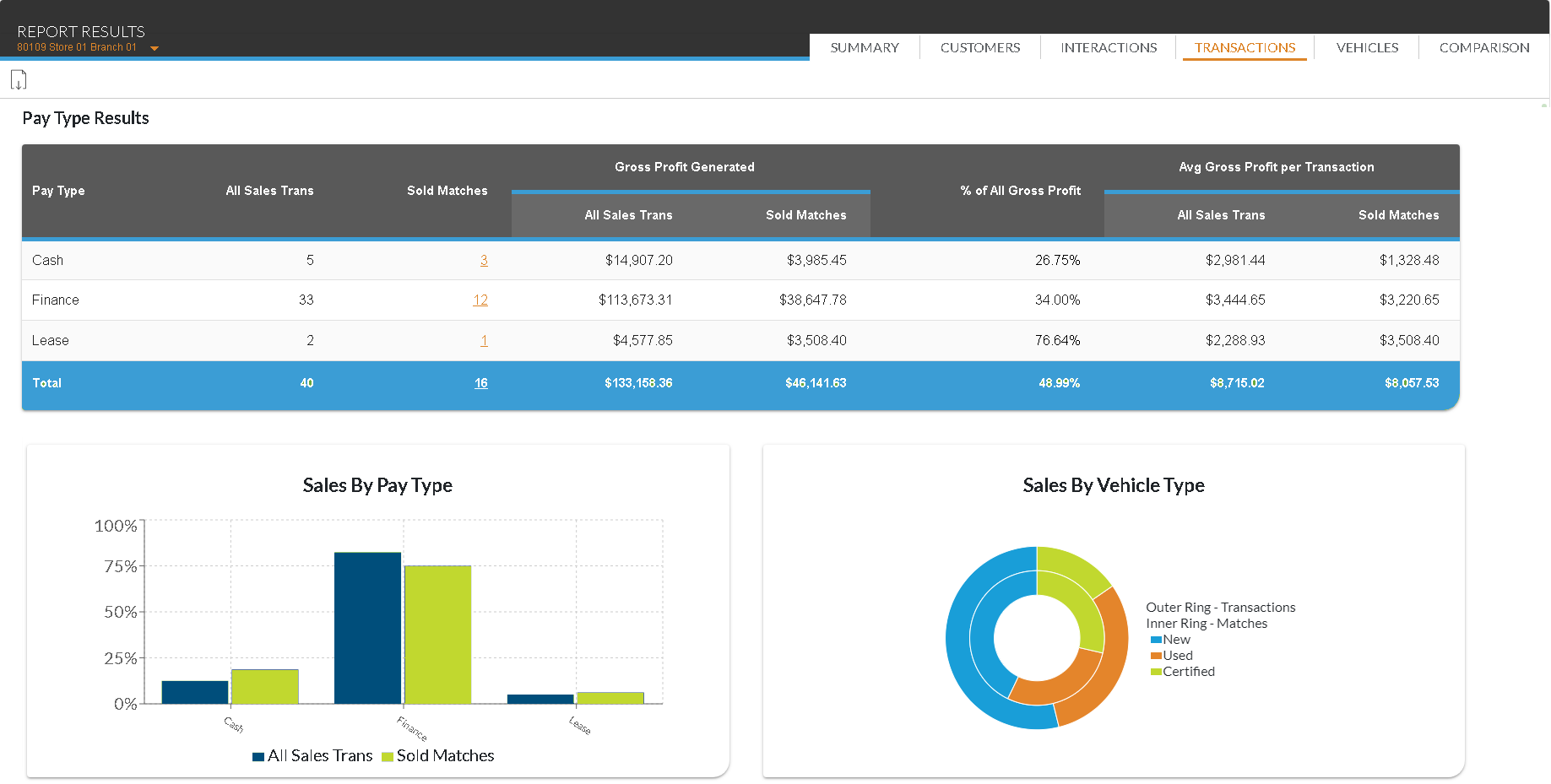
The following columns are available in the Pay Type Results panel.
Pay Type: The type of vehicle deal, such as Finance or Lease, displays.
All Sales Trans: The total number of all vehicles sold during the entered date range displays.
Sold Matches: (Link) The number of vehicles sold to XtreamService prospects during the entered date range displays as a link. Click this link to display the Detailed Results window, where details of the transactions can be reviewed.
The following fields only display if Gross Profit is selected in the Displayed Results field in the Report Criteria section at the top of this screen.
Gross Profit Generated - All Sales Trans: The gross profit generated by all vehicles sold during the entered date range displays.
Gross Profit Generated - Sold Matches: The gross profit generated by vehicles sold to prospects during the entered date range displays.
% of All Gross Profit: The percentage of total gross profit generated by all vehicles sold to prospects during the entered date range displays.
Avg Gross Profit per Transaction - All Sales Trans: The average gross profit generated by all vehicles sold during the entered date range displays.
Avg Gross Profit per Transaction - Sold Matches: The average gross profit generated by vehicles sold to prospects during the entered date range displays.
The following fields only display if Revenue is selected in the Displayed Results field in the Report Criteria section at the top of this screen.
Revenue Generated - All Sales Trans: The revenue generated by all vehicles sold during the entered date range displays.
Revenue Generated - Sold Matches: The revenue generated by vehicles sold to XtreamService prospects during the entered date range displays.
% of All Revenue: The percentage of revenue generated by vehicles sold to XtreamService prospects during the entered date range displays.
Avg Revenue per Transaction - All Sales Trans: The average revenue generated by all vehicles sold during the entered date range displays.
Avg Revenue per Transaction - Sold Matches: The average revenue generated by vehicles sold to XtreamService prospects during the entered date range displays.
Vehicle Type Results Section
The Vehicle Type Results panel is used to review information regarding vehicle sales based on whether the sold vehicles were new, used, or certified. Fields in this section display gross profit or revenue based on the entry in the Displayed Results field in the Report Criteria section.
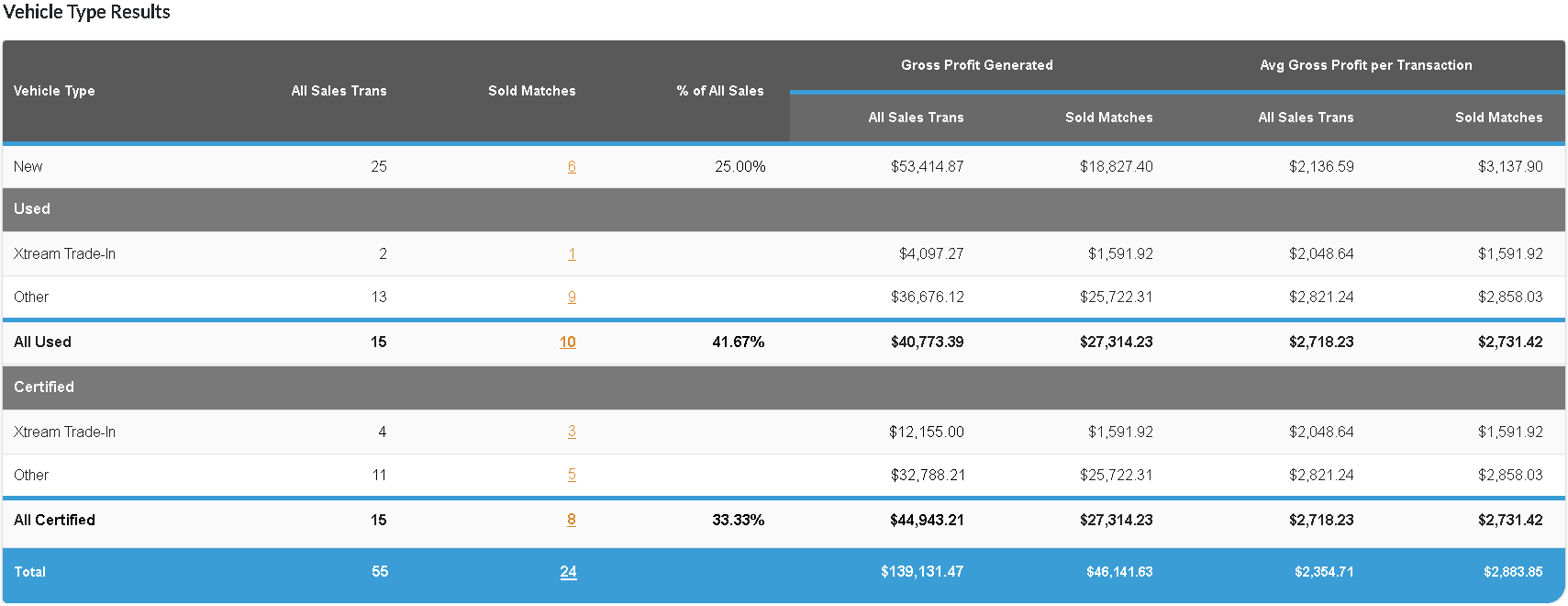
The following columns are available in the Vehicle Type Results panel.
Vehicle Type: The category of vehicle sold, such as New or Used, displays. Additionally, used and certified vehicles are divided based on whether they were trade-in vehicles purchased from XtreamService customers or vehicles obtained by other methods.
All Sales Trans: The total number of all vehicles sold during the entered date range displays.
Sold Matches: (Link) The number of vehicles sold to XtreamService prospects during the entered date range displays as a link. Click this link to display the Detailed Results window, where details about individual transactions can be reviewed.
% of All Sales: The percentage of total vehicle sales that were sold to XtreamService prospects displays.
The following fields only display if Gross Profit is selected in the Displayed Results field in the Report Criteria section at the top of this screen.
Gross Profit Generated - All Sales Trans: The gross profit generated by all vehicles sold during the entered date range displays.
Gross Profit Generated - Sold Matches: The gross profit generated by vehicles sold to XtreamService prospects during the entered date range displays.
Avg Gross Profit per Transaction - All Sales Trans: The average gross profit generated by all vehicles sold during the entered date range displays.
Avg Gross Profit per Transaction - Sold Matches: The average gross profit generated by vehicles sold to XtreamService prospects during the entered date range displays.
The following fields only display if Revenue is selected in the Displayed Results field in the Report Criteria section at the top of this screen.
Revenue Generated - All Sales Trans: The revenue generated by all vehicles sold during the entered date range displays.
Revenue Generated - Sold Matches: The revenue generated by vehicles sold to XtreamService prospects during the entered date range displays.
Avg Revenue per Transaction - All Sales Trans: The average revenue generated by all vehicles sold during the entered date range displays.
Avg Revenue per Transaction - Sold Matches: The average revenue generated by vehicles sold to XtreamService prospects during the entered date range displays.
Click here for a list of products that may be mentioned in this help file.